Äijänsuo Football Stadium – Instructions for using the scoreboard system
Äijänsuo Football Stadium
Instructions for using the scoreboard system
Current operating instructions for the sports available for you during matches:
Football
This page contains the preliminary arrangements required for the use of the Jidokan scoreboard system. If you wish to modify the files displayed during a match, the necessary files must be downloaded in advance. before the match For the USB stick, from which the match content is transferred to the scoreboard via the control tablet.
In case of problems, please contact support@jidoka.fi.
File requirements
Images to display: jpg and PNG
Media files MP4
Audio files MP3 and wav
Advertisement file formats jpg, JPEG, PNG and MP4
Optimal aspect ratios for full screen resolution: 544 x 272 pixels, double the amount compared to the screen's physical pixels (in a 5:2 aspect ratio)
Image and video file resolution: 1920 x 1080 pixels (16:9 aspect ratio)
Logo files PNG, JPEG or jpg, minimum 400 x 400 pixels (1:1 aspect ratio)
USB stick pre-setup
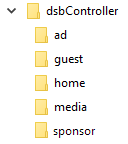
Create a folder on the USB stick called dsbController and subfolders inside this folder guest, Home, media and Sponsor.
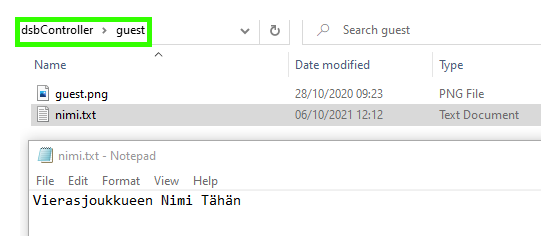
- Guest. The away team's logo and name. The logo is an image named ”guest” and the name is a .txt file with the team name on the first line.
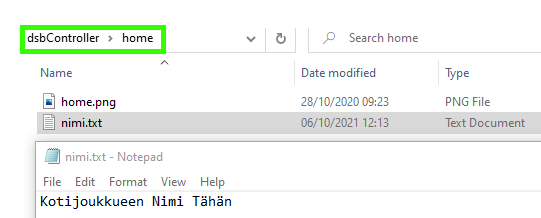
- home The content corresponding to the guest folder, but with the filename for the logo being home.png
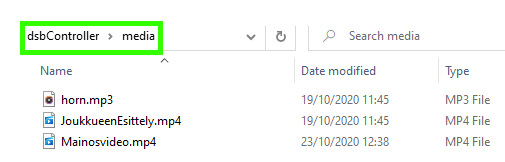
- media Video and audio files that can be played via the video and audio lists opened from the ”Show media” menu of the control tablet.